
Introduction
Is your IPTV infrastructure truly optimized for stable, high-quality streaming? In today’s competitive digital broadcasting landscape, delivering flawless video content isn’t just a luxury—it’s a necessity. Yet, countless IPTV providers, resellers, and broadcasters struggle with persistent technical challenges that undermine their service quality and customer satisfaction.
The culprits behind these streaming headaches are often the same: buffering that frustrates viewers, latency that disrupts live events, and poor encoding quality that makes content unwatchable. According to recent industry reports, the global IPTV market is projected to reach $117.1 billion by 2025, growing at a compound annual growth rate of 18.1%. This explosive growth means competition is fiercer than ever, and technical excellence has become the primary differentiator between thriving IPTV services and those that fade into obscurity.
At the heart of every successful IPTV operation lies a critical component that many overlook: IPTV Encoders. These sophisticated devices transform raw video signals into optimized, streamable formats that can be delivered seamlessly across networks to thousands—or even millions—of viewers simultaneously. Whether you’re broadcasting live sports, managing a 24/7 channel lineup, or streaming religious services to a global congregation, the quality of your IPTV encoders directly impacts viewer experience, operational efficiency, and ultimately, your bottom line.
In this comprehensive guide, we’ll explore five proven reasons why IPTV encoders are absolutely critical for IPTV success. You’ll discover the core components that make modern encoders indispensable, learn practical setup strategies, understand performance benchmarks, and gain insights into real-world deployment scenarios.
Core Components of IPTV Encoders
Understanding the fundamental building blocks of IPTV encoders is essential for making informed purchasing decisions and optimizing your streaming infrastructure. Modern IPTV hardware combines multiple sophisticated technologies to transform raw video into broadcast-ready streams.
Video Input Interfaces: The Gateway to Quality
Professional IPTV encoders support multiple video input interfaces to accommodate diverse source equipment. The most common interfaces include HDMI for modern cameras and media players, SDI for broadcast-grade equipment commonly found in television studios, and CVBS for legacy analog sources. The choice of input interface significantly impacts video quality, with SDI offering the most robust signal integrity for professional applications, while HDMI provides the best versatility for mixed equipment environments.
Codec Standards: H.264 vs H.265
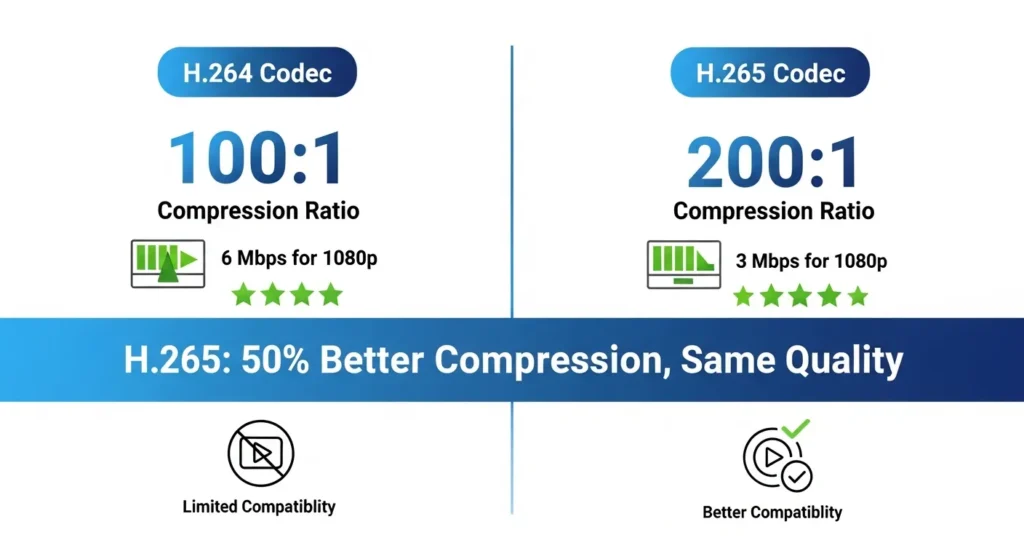
The codec is the heart of any IPTV encoder, determining how efficiently video data is compressed without sacrificing quality. The H.264 encoder (also known as AVC) remains the industry standard for IPTV transcoder applications, offering excellent compatibility across virtually all playback devices and platforms. H.264 provides reliable video compression ratios of 100:1 to 200:1, making it ideal for bandwidth-constrained environments.
However, the newer H.265 encoder (HEVC) represents a significant technological leap forward. H.265 achieves approximately 50% better video compression than H.264 at the same quality level, meaning you can deliver Full HD content at half the bitrate. This efficiency translates directly to reduced bandwidth costs and improved streaming performance, particularly beneficial for IPTV resellers managing large subscriber bases.
For beginners and small-scale operations, H.264 encoders offer the best balance of cost, compatibility, and performance. Enterprise-level deployments increasingly favor H.265 encoders for their bandwidth efficiency and future-proof capabilities.
Bitrate Control & Streaming Output Formats
Professional IPTV encoders offer sophisticated bitrate control mechanisms that balance quality against bandwidth consumption. Constant Bitrate (CBR) encoding maintains consistent data rates ideal for live streaming, while Variable Bitrate (VBR) encoding adjusts compression dynamically based on content complexity.
The versatility of output formats distinguishes professional encoders from consumer-grade alternatives. RTMP streaming (Real-Time Messaging Protocol) remains the dominant choice for live video broadcasting to platforms like YouTube Live, Facebook Live, and custom streaming servers. UDP with multicast capabilities enables efficient distribution within local networks, perfect for hotel IPTV systems. SRT (Secure Reliable Transport) has emerged as the preferred streaming protocol for long-distance transmission, offering superior error correction and encryption. IPTV encoders.
Setup Time & Operational Efficiency
One of the most compelling advantages of modern IPTV encoders is their remarkable ease of deployment. Unlike complex broadcast equipment of the past, today’s professional encoders can be operational within minutes.
From Unboxing to First Stream: The 10-Minute Reality
Professional-grade IPTV hardware designed for the modern market prioritizes rapid deployment. Most quality encoders feature intuitive web-based interfaces accessible from any device with a browser. The typical encoder setup process—from physically unpacking the device to delivering your first live stream—averages just 10 to 15 minutes for users with basic networking knowledge.
This efficiency stems from intelligent default configurations that work out-of-the-box for common scenarios, auto-detection capabilities that identify connected video sources automatically, and guided setup wizards that walk users through essential configurations step-by-step.
Hardware vs Software Encoders
The debate between hardware IPTV encoders and software alternatives centers on reliability and performance consistency. Hardware encoders deliver dedicated processing power immune to the resource contention that affects software encoders running on general-purpose computers. This translates to lower latency (typically 1-2 seconds versus 3-5+ seconds for software solutions), more consistent quality, and superior reliability during extended operational periods.
While software encoders offer flexibility and lower initial costs, professional IPTV operations consistently favor hardware encoders for their set-and-forget reliability and reduced power consumption.
Step-by-Step IPTV Encoder Setup Guide
Successfully deploying an encoder setup requires methodical attention to five critical configuration stages.
Step 1: Connect Your Video Source
Begin by identifying your video source type—camera, media player, satellite receiver, or computer output. Connect your source to the appropriate input port on your IPTV encoder using high-quality cables rated for your target resolution. For HDMI to IP conversions, ensure your HDMI cable supports the required bandwidth—standard HDMI cables work for 1080p, while HDMI 2.0 cables are necessary for 4K content.
Pro Tip: Always verify your video source is actively outputting before troubleshooting encoder issues. Many setup difficulties stem from inactive or improperly configured source devices rather than encoder problems.
Step 2: Configure Network Settings
Access your encoder’s web interface and assign a static IP address within your network’s subnet range. Record the gateway address (typically your router’s IP) and DNS servers. For IPTV operations requiring remote access, configure port forwarding on your router to allow external connections to the encoder’s management interface.
Pro Tip: Use a static IP address outside your DHCP pool range to prevent IP conflicts. Document all network configurations in a secure location for future reference. IPTV encoders.
Step 3: Set Streaming Destination
Define where your encoded stream will be delivered. For RTMP streaming to platforms like YouTube or Facebook, obtain your stream key and server URL from the platform’s live streaming dashboard. For private IPTV servers, configure the destination IP address and port number provided by your server administrator.
Pro Tip: Test connectivity to your streaming destination before going live. Most encoders include built-in diagnostic tools that verify network paths and server availability.
Step 4: Optimize Bitrate, Resolution, and Codec
Video quality optimization requires balancing resolution, bitrate, and codec selection. For 1080p HD content using H.264, target bitrates between 4,000 to 6,000 Kbps for excellent quality, while 720p content performs well at 2,500 to 4,000 Kbps. H.265 encoders achieve comparable quality at approximately 50% lower bitrates. Audio configuration typically uses AAC encoding at 128 Kbps stereo for broadcast quality.
Pro Tip: Start with conservative bitrate settings and increase gradually while monitoring stream stability. It’s easier to add bandwidth than recover from unstable streams.
Step 5: Go Live and Monitor Performance
Initiate your stream and immediately verify successful connection to your streaming destination. Most professional encoders display real-time statistics including current bitrate, dropped frames, buffer status, and connection uptime. Monitor these metrics during the critical first 5-10 minutes of streaming to identify any stability issues.
Pro Tip: Establish a monitoring routine that includes checking encoder statistics, viewing stream quality, and verifying server connectivity.
Performance & Streaming Quality Benchmarks
Understanding performance specifications helps you select appropriate IPTV encoders for your specific requirements and set realistic expectations for streaming quality and capabilities.
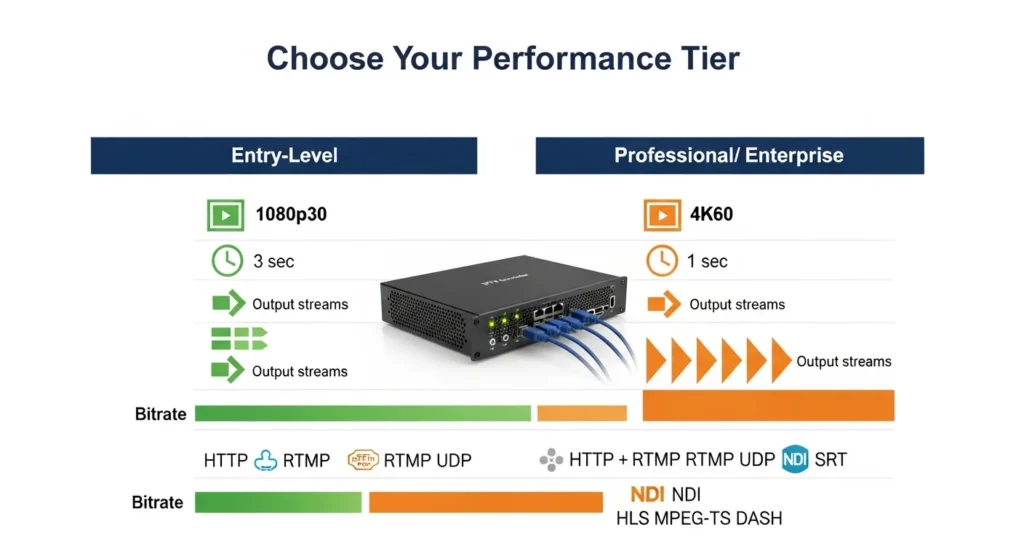
| Specification | Entry-Level | Professional/Enterprise |
|---|---|---|
| Maximum Resolution | 1080p@30fps | 4K@60fps |
| Bitrate Range | 500 Kbps – 8 Mbps | 500 Kbps – 40 Mbps |
| Encoding Latency | 2-4 seconds | 500ms – 2 seconds |
| Supported Codecs | H.264 | H.264, H.265/HEVC |
| Output Protocols | RTMP, UDP, HLS | RTMP, UDP, HLS, SRT, Multicast, RTSP |
| Simultaneous Outputs | 1-2 | 4-16+ |
These benchmarks illustrate the substantial performance differences between encoder categories. Entry-level units serve individual content creators and small venues adequately, while professional equipment handles demanding enterprise deployments with multiple concurrent streams and advanced features.
Better Alternatives & Encoder Add-ons
As streaming requirements evolve, organizations benefit from understanding upgrade paths and complementary technologies that enhance IPTV encoder capabilities.
Upgrading to H.265 Encoders for Bandwidth Savings
Organizations experiencing bandwidth constraints should prioritize migration to H.265/HEVC encoding. The 50% bandwidth reduction translates to lower CDN costs for IPTV resellers and improved quality-of-experience for viewers with limited internet speeds. A typical IPTV service delivering 24/7 content to 1,000 viewers can save $500-$1,500 monthly in bandwidth costs after switching from H.264 to H.265, recovering equipment costs within 6-12 months.
Multi-Platform Encoders & Audio Solutions
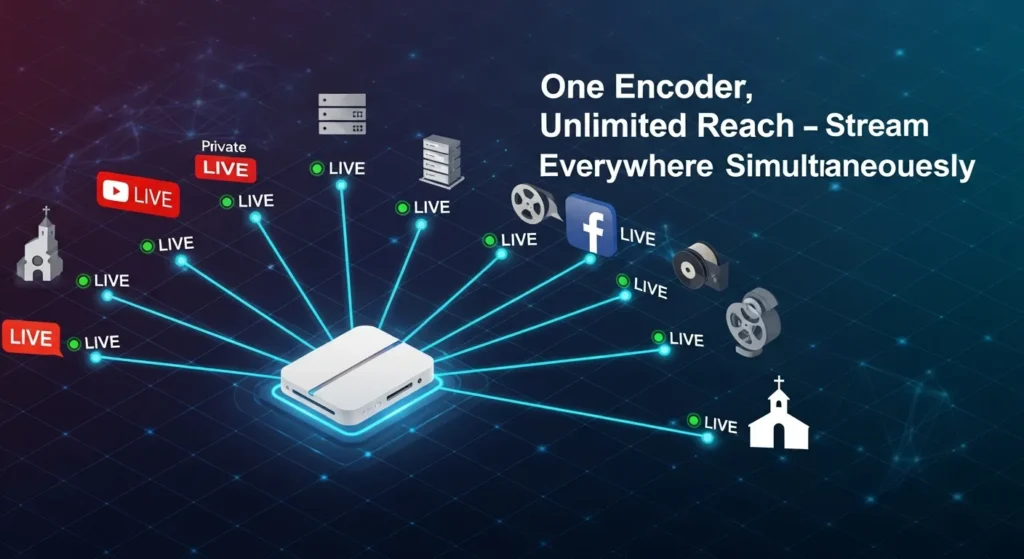
Advanced IPTV encoders supporting simultaneous multi-destination streaming eliminate the need for duplicate encoding equipment. Encoders with 8+ simultaneous outputs enable distribution to multiple social media platforms, regional servers, and archive systems from one source.
Professional broadcasting often requires external audio embedders to integrate separate audio sources like wireless microphones or mixing consoles, providing professional-grade audio control unavailable from camera-embedded audio alone.
Recommendations by User Type
IPTV Resellers: Prioritize H.265 encoders with multi-output capabilities and remote management features supporting 4-8 simultaneous outputs.
Churches: Invest in encoders with excellent audio processing and user-friendly interfaces. Features like scheduled streaming reduce technical staffing requirements.
Sports Broadcasters: Demand ultra-low-latency encoders with SRT support for remote production workflows.
Event Production Teams: Require portable, rugged encoders with bonded cellular capabilities for streaming from locations lacking network infrastructure.
IPTV Encoder Deployment Use Cases
Understanding real-world applications demonstrates the versatility of professional IPTV encoder technology across diverse industries. IPTV encoders
24/7 IPTV Channels for Resellers
IPTV resellers building channel packages require encoders capable of continuous operation without degradation. Modern multi-channel encoders consolidate infrastructure, with single rack-mounted units handling 4-8 channels simultaneously. This consolidation reduces power consumption by 60-70% and simplifies management through unified interfaces. Redundancy configurations ensure uninterrupted service, maintaining 99.9%+ uptime critical for subscriber satisfaction.
Live Sports and Church Streaming
Live event streaming demands reliability and simplicity. Churches streaming weekend services require encoders with minimal technical overhead—volunteers should be able to initiate streams with single-button operation. Pre-configured streaming profiles eliminate complex setup, while scheduled streaming capabilities automatically start and stop broadcasts at predetermined times.
Hotel and Hospitality IPTV Systems
Hotels deploying in-room entertainment systems use IPTV encoders to distribute both broadcast channels and proprietary content. A typical 200-room hotel might deploy 10-15 encoders converting satellite and cable feeds into IP streams. Multicast distribution proves particularly efficient—a single encoded stream replicates to hundreds of viewers simultaneously without increasing bandwidth consumption.
Remote Broadcasting Scenarios
Emerging applications include streaming from drones, mobile vehicles, and temporary installations. Bonded cellular encoders aggregate multiple mobile connections for reliable bandwidth even in areas with inconsistent coverage, enabling production companies to stream from remote venues without traditional satellite trucks.
Common IPTV Encoder Mistakes to Avoid
Even experienced broadcasters occasionally make configuration errors that compromise stream quality or reliability.
Choosing the Wrong Streaming Protocol
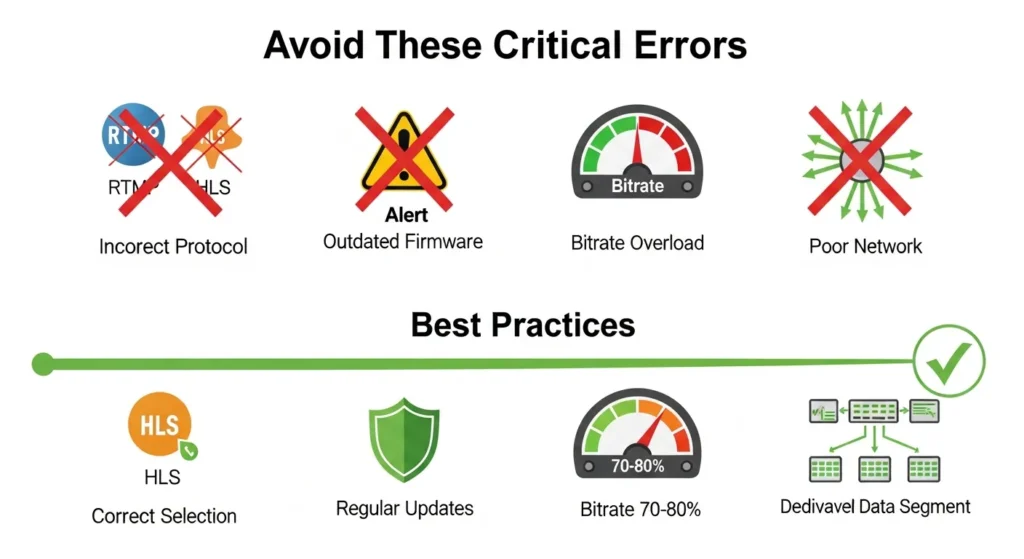
Protocol selection dramatically impacts streaming performance. RTMP excels for contribution feeds but introduces latency unsuitable for interactive applications. UDP multicast delivers exceptional efficiency within local networks but cannot traverse the public internet. HLS provides universal compatibility but suffers from 10-30 second delays. Match protocols to use cases: RTMP for streaming to platforms, SRT for long-distance contribution, Multicast UDP for hotel distribution, and HLS for public internet delivery.
Ignoring Firmware Updates
Manufacturers regularly release firmware updates addressing security vulnerabilities and improving encoding efficiency. Establish a quarterly firmware review schedule. Test firmware on development units before updating production equipment to verify compatibility.
Overloading Bitrate Settings
Setting bitrates too close to available bandwidth capacity leaves no margin for network fluctuations, resulting in buffering and quality degradation. Conservative configurations—utilizing 70-80% of available bandwidth—provide buffer capacity absorbing temporary network congestion. Beyond certain thresholds (typically 8-10 Mbps for 1080p H.264), additional bitrate yields diminishing returns. IPTV encoders.
Poor Network Planning
Inadequate network infrastructure undermines even the most sophisticated encoders. Proper network design dedicates VLANs or physical segments to IPTV traffic, implements QoS policies ensuring streaming packets receive priority, and provides 150-200% of required bandwidth for overhead and fluctuation absorption.
Maintenance & Long-Term Storage Tips
Professional maintenance practices extend equipment lifespan and ensure consistent performance throughout years of operation. IPTV encoders.
Monthly Maintenance & Storage
Physically inspect encoders monthly for dust accumulation around ventilation ports and fans. Use compressed air to clear debris, ensuring adequate airflow prevents overheating. Verify all cable connections remain secure and review encoder logs for error messages or warnings.
Store encoders in climate-controlled environments maintaining 15-25°C (59-77°F) with relative humidity between 30-50%. Use original packaging or protective cases preventing physical damage during storage and transport.
Firmware Updates & Configuration Backups
Beyond feature improvements, firmware updates address security vulnerabilities. Quarterly security reviews should assess firmware currency, verify strong password policies, and confirm network segmentation isolates IPTV equipment from public-facing systems. IPTV encoders.
Export encoder configurations monthly, storing backups securely off-site. Document custom settings and non-obvious configurations in written procedures—knowledge transfer proves invaluable when staff changes occur or troubleshooting requires external assistance. IPTV encoders.
Conclusion
The success of modern IPTV operations fundamentally depends on the quality, reliability, and proper deployment of IPTV encoders. These sophisticated devices bridge the gap between raw video sources and streamable content, enabling organizations to deliver professional-grade streaming experiences that meet increasingly demanding viewer expectations. IPTV encoders.
Throughout this guide, we’ve demonstrated how proper encoder selection, configuration, and maintenance directly impact streaming quality, operational efficiency, and long-term scalability. Whether you’re an IPTV reseller building a channel portfolio, a church reaching distant congregations, a sports broadcaster capturing live events, or a hospitality provider enhancing guest experiences, investing in appropriate IPTV encoder technology positions your organization for sustainable growth.
Ready to take your IPTV service to the next level? Invest in reliable IPTV encoders today and experience smoother, professional-grade streaming that keeps viewers engaged and satisfied. Share your encoder setup experiences in the comments below, or subscribe for more comprehensive IPTV guides, product reviews, and industry insights. IPTV encoders.
Frequently Asked Questions
Q1: What is the difference between an IPTV encoder and an IPTV transcoder?
A: An IPTV encoder converts raw video from sources like HDMI cameras, SDI equipment, or analog feeds into streamable digital formats using codecs like H.264 or H.265. The encoder takes uncompressed or lightly compressed video and creates the initial stream. In contrast, an IPTV transcoder modifies existing encoded streams by changing their resolution, bitrate, codec, or other parameters without returning to the original source. Transcoders are used when you already have an encoded stream but need to adapt it for different delivery scenarios, such as creating mobile-optimized versions of existing HD streams. IPTV encoders.
Q2: Can one IPTV encoder stream to multiple platforms simultaneously?
A: Yes, professional IPTV encoders commonly support multi-streaming capabilities that enable simultaneous broadcasting to multiple destinations. Entry-level encoders typically support 1-2 simultaneous outputs, while professional and enterprise units can stream to 4, 8, or even 16+ destinations concurrently. This allows you to broadcast the same content to platforms like YouTube Live, Facebook Live, your private IPTV server, and backup recording systems all from a single encoder, significantly reducing equipment costs and simplifying production workflows.
Q3: Do IPTV encoders support 4K streaming?
A: High-end professional IPTV encoders support 4K streaming at frame rates up to 60fps, though this capability requires significantly more processing power and bandwidth than standard HD streaming. However, 1080p Full HD using H.264 or H.265 codecs remains the most practical choice for most IPTV deployments. The bandwidth requirements for 4K streaming (15-25 Mbps for H.264, 8-15 Mbps for H.265) exceed what many viewers can reliably receive, and many end-user devices still lack true 4K decoding capabilities. For these reasons, mainstream IPTV services typically standardize on 1080p delivery, reserving 4K for premium tiers or special applications.