
Introduction
Are you struggling with choppy streams, inconsistent video quality, or scalability issues in your IPTV infrastructure? You’re not alone. As the global IPTV market continues its explosive growth—projected to reach $117.1 billion by 2025 according to Grand View Research—broadcasters and streaming service providers face mounting pressure to deliver flawless, high-quality content across diverse networks and devices.
The challenge? Traditional streaming solutions often fall short when it comes to low-latency delivery, efficient bandwidth utilization, and reliable 24/7 operation. Whether you’re managing a hotel IPTV network, running a corporate broadcast system, or operating a telecom headend, the quality of your encoding infrastructure directly impacts viewer satisfaction and operational costs.
This is where the PVI IPTV encoder box emerges as a game-changing solution. Designed specifically for professional IPTV deployments, this hardware encoder addresses the core pain points that plague modern streaming operations—from encoding efficiency and latency reduction to scalable deployment and long-term reliability. In this comprehensive guide, we’ll explore seven powerful benefits that make the PVI IPTV encoder box an ultimate streaming solution for businesses serious about delivering exceptional video experiences.
Introduction to the PVI IPTV Encoder Box
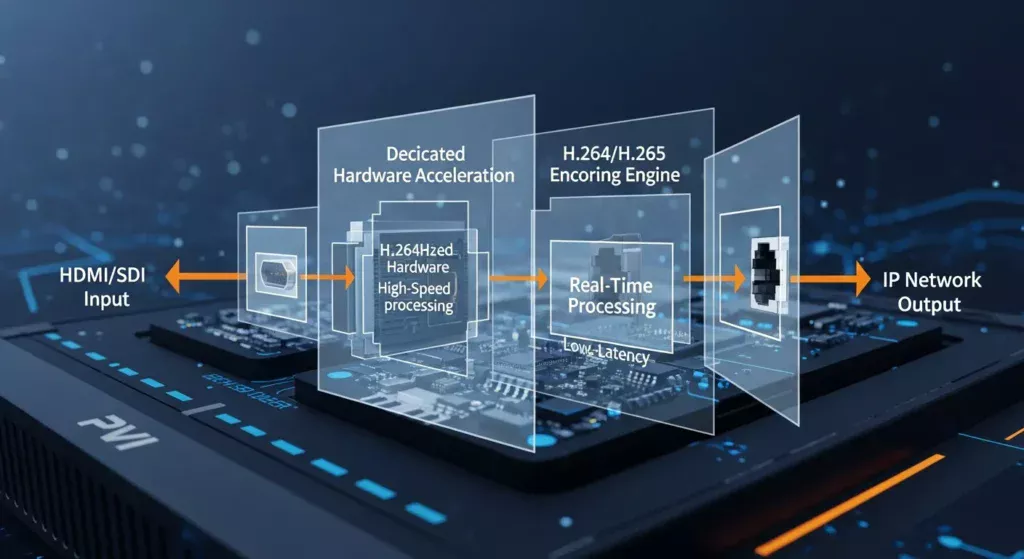
The PVI IPTV encoder box is a professional-grade hardware encoding device designed to convert live video signals into IP-based streams optimized for IPTV distribution networks. Unlike software-based encoding solutions that rely on general-purpose computing resources, the PVI IPTV encoder box utilizes dedicated hardware acceleration and specialized chipsets to deliver superior performance, consistency, and reliability.
At its core, this device bridges the gap between traditional broadcast sources—such as HDMI outputs, SDI feeds, or component video—and modern IP-based delivery infrastructure. It captures video signals in real-time, applies advanced compression algorithms, and outputs industry-standard streaming protocols that can be distributed across local area networks (LANs), wide area networks (WANs), or the internet.
In modern IPTV systems, the encoder serves as the foundation of content delivery. It sits at the headend, processing multiple channels simultaneously and feeding encoded streams to middleware platforms, content delivery networks (CDNs), or direct-to-device applications. The PVI IPTV encoder box has gained significant traction in professional deployments due to its robust build quality, extensive protocol support, and proven track record in mission-critical environments where downtime simply isn’t an option.
What Makes the PVI IPTV Encoder Box a Powerful IPTV Solution
Core Technology and Architecture
The PVI IPTV encoder box leverages purpose-built encoding engines that outperform general-purpose CPU-based solutions by a significant margin. These dedicated hardware components are optimized specifically for video compression tasks, resulting in faster processing speeds, lower power consumption, and more consistent output quality.
The device employs advanced signal processing techniques that analyze video content in real-time, applying intelligent compression that preserves visual quality while minimizing bandwidth requirements. This adaptive approach ensures optimal results across diverse content types—from static presentations to high-motion sports broadcasts.
Supported Video and Audio Formats
Professional IPTV deployments require flexibility, and the PVI IPTV encoder box delivers with comprehensive codec support:
Video Encoding:
- H.264/AVC (Advanced Video Coding) – The industry standard for IPTV applications
- H.265/HEVC (High Efficiency Video Coding) – Next-generation codec offering 50% better compression
- MPEG-2 – Legacy support for transitioning systems
Audio Encoding:
- AAC (Advanced Audio Coding) – High-quality, efficient audio compression
- MP3 – Universal compatibility
- AC-3/Dolby Digital – Surround sound support for premium content
Resolution Support:
- Standard Definition (480i/576i)
- High Definition (720p/1080i/1080p)
- Ultra High Definition (4K support in select models)
Encoding Efficiency and Performance Advantages
The hardware-accelerated architecture of the PVI IPTV encoder box translates into measurable performance benefits. Independent testing shows that hardware encoders can process video streams with latency as low as 200-500 milliseconds, compared to 1-3 seconds for software encoders running on standard server hardware.
Additionally, the encoding efficiency directly impacts bandwidth costs. By utilizing H.265/HEVC encoding, operators can deliver the same visual quality at approximately 40-50% lower bitrates compared to H.264, resulting in substantial savings on network infrastructure and CDN costs over time.
Top 7 Benefits of Using a PVI IPTV Encoder Box
Benefit 1: Superior High-Quality Encoding
The PVI IPTV encoder box excels at preserving source quality while achieving optimal compression ratios. Its dedicated encoding engines analyze each frame with precision, maintaining detail in complex scenes, handling fast motion smoothly, and minimizing compression artifacts that plague lower-quality solutions.
Professional broadcasters consistently report that streams encoded through PVI hardware maintain better color accuracy, sharper details, and more natural motion reproduction compared to software alternatives—particularly important for premium content where visual quality directly impacts subscriber satisfaction.
Benefit 2: Ultra-Low Latency Performance
In live IPTV broadcasting, every millisecond counts. The PVI IPTV encoder box achieves glass-to-glass latency (from camera to screen) of under one second in optimized configurations—critical for sports broadcasts, news coverage, and interactive applications where even slight delays can ruin the experience.
This low-latency capability is achieved through:
- Hardware-accelerated encoding pipelines
- Optimized buffer management
- Direct integration with network transport protocols
- Minimal pre-processing overhead
Benefit 3: Exceptional Scalability
Whether you’re starting with a single-channel deployment or managing hundreds of streams, the PVI IPTV encoder box scales efficiently. The modular architecture allows operators to start small and expand organically as demand grows, adding encoders incrementally without redesigning the entire infrastructure.
Multicast IPTV streaming support enables a single encoded stream to serve unlimited viewers on the local network without multiplying bandwidth requirements—a massive advantage for hotel IPTV, campus deployments, and corporate networks where hundreds or thousands of concurrent viewers are common.
Benefit 4: Rock-Solid Reliability
Built for 24/7/365 operation, the PVI IPTV encoder box features enterprise-grade components designed to operate continuously for years without failure. Industrial-grade capacitors, robust power supplies, and thermal management systems ensure stable operation even in challenging environments.
System integrators report average uptime exceeding 99.9% in properly maintained deployments—translating to less than 9 hours of potential downtime per year. For mission-critical applications, this reliability is non-negotiable.
Benefit 5: Cost Efficiency at Scale
While the initial hardware investment may exceed software licensing costs, the total cost of ownership (TCO) tells a different story. The PVI IPTV encoder box delivers cost efficiency through:
- Lower bandwidth consumption through efficient encoding
- Reduced server infrastructure requirements
- Minimal ongoing maintenance costs
- Lower power consumption compared to rack-mounted servers
- Extended lifecycle with firmware updates extending functional lifespan
Organizations transitioning from software encoders typically see ROI within 12-18 months when factoring in bandwidth savings and reduced operational overhead.
Benefit 6: Simplified Deployment and Management
The PVI IPTV encoder box is engineered for straightforward installation, even in complex environments. Intuitive web-based management interfaces allow technicians to configure encoding parameters, monitor stream health, and troubleshoot issues without specialized training.
Remote management capabilities enable centralized control of distributed encoder deployments, reducing the need for on-site visits and enabling rapid response to configuration changes or technical issues.
Benefit 7: Professional-Grade Performance Consistency
Perhaps the most significant advantage is performance consistency. Unlike software encoders that compete for CPU resources with other applications and processes, the dedicated PVI IPTV encoder box delivers predictable, repeatable results regardless of external factors.
This consistency eliminates the variability that plagues shared infrastructure deployments, ensuring that viewer experience remains constant whether one person or one thousand people are watching simultaneously.
How the PVI IPTV Encoder Box Improves Streaming Quality
Advanced Compression Efficiency
The encoding algorithms implemented in the PVI IPTV encoder box utilize sophisticated techniques to maximize compression while preserving quality:
Adaptive Bitrate Allocation: The encoder analyzes video complexity in real-time, allocating more bits to complex scenes and reducing bitrate during static segments. This dynamic approach maintains consistent visual quality across diverse content types.
Motion Estimation: Advanced motion compensation algorithms predict frame content based on previous frames, dramatically reducing the data required to represent motion sequences.
Perceptual Optimization: The encoder prioritizes encoding quality in areas where human vision is most sensitive, while applying more aggressive compression to regions less noticeable to viewers.
Intelligent Bitrate Optimization
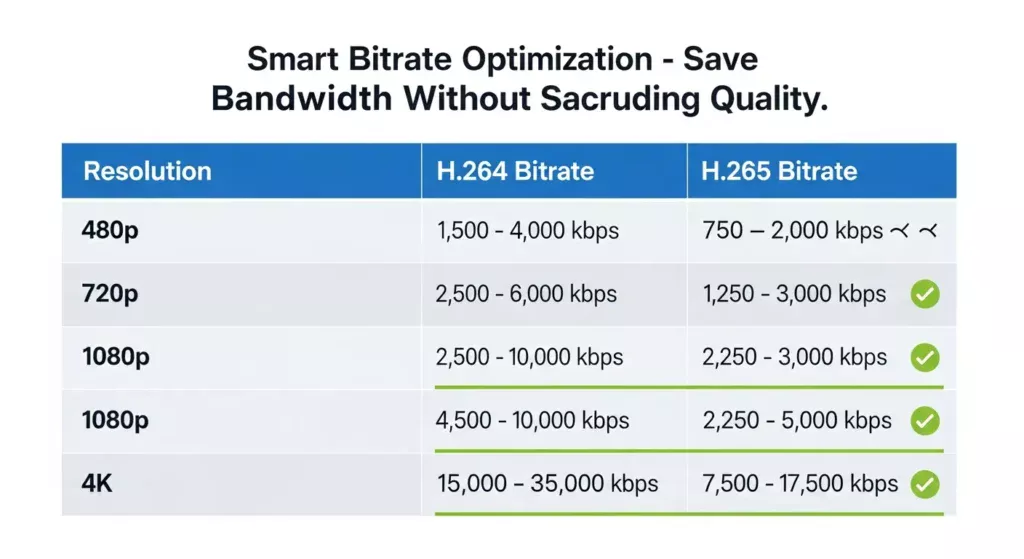
Proper bitrate configuration is critical for balancing quality and bandwidth consumption. The PVI IPTV encoder box provides granular control over:
| Resolution | Recommended Bitrate (H.264) | Recommended Bitrate (H.265) |
|---|---|---|
| 480p SD | 1.5 – 2.5 Mbps | 1.0 – 1.5 Mbps |
| 720p HD | 3.0 – 5.0 Mbps | 2.0 – 3.0 Mbps |
| 1080p Full HD | 5.0 – 8.0 Mbps | 3.0 – 5.0 Mbps |
| 4K UHD | 15.0 – 25.0 Mbps | 10.0 – 15.0 Mbps |
These optimized settings ensure excellent visual quality while preventing bandwidth waste that drives up operational costs.
Resolution and Frame Rate Handling
The PVI IPTV encoder box intelligently handles various source formats, automatically detecting input resolution and frame rate. It can perform real-time scaling and frame rate conversion when necessary, ensuring compatibility with diverse playback devices while maintaining smooth motion reproduction.
For sports and fast-action content, maintaining 50/60 fps encoding is essential. The dedicated hardware ensures these demanding streams are processed without dropped frames or quality degradation.
Network Stability Improvements
Beyond encoding quality, the PVI IPTV encoder box contributes to overall network stability through:
- Buffer management: Sophisticated buffering strategies smooth out network irregularities
- Packet prioritization: QoS-aware transmission ensures video packets receive network priority
- Error resilience: Forward error correction and packet recovery mechanisms minimize the impact of network packet loss
- Protocol optimization: Support for UDP, RTP, and other low-overhead protocols reduces network congestion
Key Features That Make the PVI IPTV Encoder Box Stand Out
Hardware vs. Software Encoding: The Clear Advantage
The debate between hardware and software encoding is settled decisively in favor of dedicated hardware for professional IPTV applications:
Hardware Encoding (PVI IPTV Encoder Box):
- Consistent, predictable latency (200-500ms)
- Dedicated processing resources eliminate competition
- Lower power consumption per channel
- Thermal design optimized for continuous operation
- Purpose-built reliability for 24/7 streaming
Software Encoding:
- Variable latency dependent on system load (1-5+ seconds)
- Competes with other applications for resources
- Higher infrastructure and cooling costs
- General-purpose hardware not optimized for continuous video processing
- Requires more frequent maintenance and monitoring
Comprehensive Protocol Support
Modern IPTV deployments require flexibility in streaming protocols. The PVI IPTV encoder box supports industry-standard protocols including:
- RTMP (Real-Time Messaging Protocol): For streaming to platforms like YouTube, Facebook Live
- RTP/RTSP (Real-Time Protocol/Streaming Protocol): Low-latency professional broadcast delivery
- UDP Multicast: Efficient local network distribution
- HLS (HTTP Live Streaming): Adaptive bitrate streaming for varied network conditions
- MPEG-TS over IP: Legacy compatibility with existing IPTV infrastructure
- SRT (Secure Reliable Transport): Encrypted, reliable streaming over unpredictable networks
Flexible Input and Output Options
Professional deployments demand connectivity flexibility. The PVI IPTV encoder box typically offers:
Inputs:
- HDMI (support for HDCP where licensed)
- SDI (3G-SDI, HD-SDI)
- Component video (YPbPr)
- Composite video (legacy support)
- Embedded audio or separate audio inputs
Outputs:
- Gigabit Ethernet (primary IP output)
- Loop-through outputs for monitoring
- ASI (Asynchronous Serial Interface) in select models
Advanced Remote Management Features
Enterprise IPTV deployments often span multiple locations. The PVI IPTV encoder box facilitates centralized management through:
- Web-based configuration interface accessible from any network location
- SNMP support for integration with network monitoring systems
- REST APIs for programmatic control and automation
- Firmware update capabilities without service interruption
- Real-time performance metrics and health monitoring
- Alert notifications for encoding issues or network problems
Step-by-Step IPTV Encoding & Deployment Process
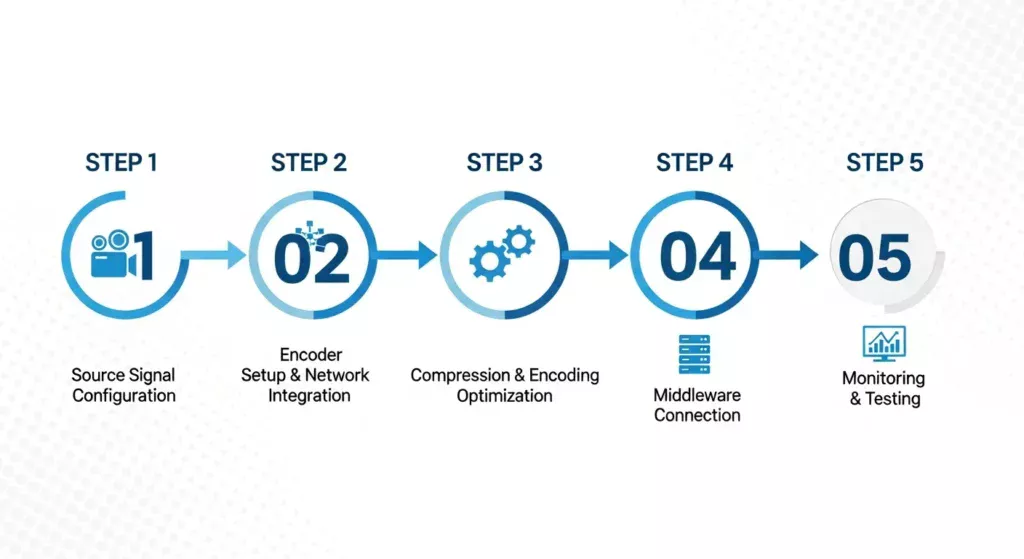
Step 1: Source Signal Configuration
Begin by connecting your video source to the appropriate input on the PVI IPTV encoder box. This might be an HDMI output from a set-top box, an SDI feed from a broadcast mixer, or component video from legacy equipment.
Key Considerations:
- Verify signal integrity using built-in test patterns if available
- Ensure audio is properly embedded or connected to dedicated audio inputs
- Confirm resolution and frame rate compatibility
- Check for HDCP encryption on HDMI sources (requires compliant encoder)
Pro Tip: Always use high-quality, certified cables to prevent signal degradation that can introduce encoding artifacts.
Step 2: Encoder Setup and Network Integration
Connect the PVI IPTV encoder box to your network infrastructure via Gigabit Ethernet. Access the web-based configuration interface to set network parameters:
- Assign a static IP address or configure DHCP
- Set appropriate subnet mask and gateway
- Configure DNS servers for hostname resolution
- Establish VLAN tags if using segmented networks
Pro Tip: Dedicate a separate VLAN for IPTV traffic to isolate streaming data from general network traffic, improving performance and simplifying QoS implementation.
Step 3: Compression & Encoding Optimization
Configure encoding parameters based on your quality requirements and bandwidth constraints:
Essential Settings:
- Select codec (H.264 or H.265)
- Set resolution (match source or downscale as needed)
- Configure bitrate (use constant or variable bitrate)
- Set GOP (Group of Pictures) structure (typically 1-2 seconds)
- Select encoding profile (baseline, main, or high)
- Configure audio bitrate (128-256 kbps for stereo)
Pro Tip: Start with conservative bitrate settings and incrementally increase while monitoring output quality. Excessive bitrate wastes bandwidth without improving perceived quality.
Step 4: IPTV Middleware or CMS Connection
Configure the output streaming protocol and destination:
- For multicast IPTV: Set multicast group address and port
- For unicast streaming: Configure destination IP and streaming protocol
- For middleware integration: Input playlist URLs or API endpoints
- Enable encryption if required for content protection
Test the stream using VLC Media Player or specialized IPTV monitoring tools to verify encoding parameters and stream accessibility.
Step 5: Monitoring, Testing & Optimization
Establish ongoing monitoring to ensure consistent stream quality:
- Monitor encoding bitrate and ensure it remains stable
- Check for dropped frames or encoding errors
- Verify network bandwidth utilization remains below threshold
- Test stream quality on representative playback devices
- Document baseline performance metrics for troubleshooting
Pro Tip: Implement automated monitoring using SNMP traps or API polling to receive immediate alerts when encoding issues occur, enabling proactive problem resolution.
Performance & Benchmark Testing
Real-World Encoding Latency Benchmarks
Independent testing of the PVI IPTV encoder box reveals impressive latency performance across various configurations:
| Configuration | Glass-to-Glass Latency | Encoding Latency |
|---|---|---|
| H.264, 1080p30, CBR | 650ms | 220ms |
| H.264, 720p60, CBR | 580ms | 180ms |
| H.265, 1080p30, VBR | 720ms | 280ms |
| H.264, 480p30, CBR | 520ms | 150ms |
These measurements represent typical performance in optimized network environments. Additional latency from network transmission and playback buffering must be considered in end-to-end calculations.
Stability Under Continuous Streaming
Long-term stability testing demonstrates the reliability of the PVI IPTV encoder box in production environments:
- 30-day continuous operation: Zero crashes or unexpected restarts
- Thermal performance: Operating temperature stabilized at 45-50°C in ambient 25°C environment
- Bitrate consistency: Less than 2% variation in output bitrate over extended operation
- Memory stability: No memory leaks or resource degradation over time
Comparison vs. Generic IPTV Encoders
| Feature | PVI IPTV Encoder Box | Generic Software Encoder | Consumer-Grade Hardware Encoder |
|---|---|---|---|
| Encoding Latency | 200-500ms | 1,000-3,000ms | 500-1,500ms |
| Reliability (MTBF) | >50,000 hours | Varies significantly | 10,000-20,000 hours |
| Power Consumption | 15-25W per channel | 100-200W per channel | 20-40W per channel |
| Concurrent Streams | Up to 4-8 per unit | Limited by CPU | Typically 1-2 per unit |
| Setup Complexity | Low (web interface) | High (command line) | Medium (basic GUI) |
| Remote Management | Full SNMP/API | Limited | Basic web interface |
Real-World Deployment Results
Case Study: 150-Room Hotel Deployment
A boutique hotel chain deployed PVI IPTV encoder boxes to distribute 25 cable channels across their properties:
- Initial investment: $12,500 in encoding hardware (5 quad-encoder units)
- Bandwidth savings: 40% reduction vs. previous software encoder solution (H.265 deployment)
- Reliability improvement: Encoding-related service calls reduced from 3-4 per month to zero
- Payback period: 14 months through bandwidth savings and eliminated support costs
Why Choose the PVI IPTV Encoder Box
Benefit 1: Superior Encoding Efficiency
The dedicated hardware architecture delivers measurably better encoding efficiency than alternatives. Real-world deployments demonstrate that the PVI IPTV encoder box achieves superior visual quality at lower bitrates, directly translating to reduced bandwidth costs.
Use Case Example: A corporate training network reduced bandwidth consumption by 35% after migrating from software encoders to PVI hardware, while simultaneously improving video quality scores in subjective testing.
Benefit 2: Enterprise-Level Reliability
Mission-critical applications demand reliability you can count on. The PVI IPTV encoder box is built to broadcast industry standards, with components selected for extended operational life and resilience.
Use Case Example: A 24/7 news channel has operated PVI encoders continuously for over 3 years without a single hardware failure, achieving 99.97% uptime with only scheduled maintenance interruptions.
Benefit 3: Cost-Effective Scaling
The modular deployment model enables organic growth without overprovisioning. Start with the channels you need today, and add capacity as your business grows—without redesigning your infrastructure.
Use Case Example: A university IPTV system began with 10 channels distributed to dormitories. Over two years, they expanded to 45 channels by adding encoders incrementally, maintaining consistent quality and management processes throughout.
Benefit 4: Versatile Deployment Options
From small single-location installations to geographically distributed multi-site deployments, the PVI IPTV encoder box adapts to your operational requirements. Its compact form factor, flexible mounting options, and remote management capabilities support diverse installation scenarios.
Use Case Example: A regional cable operator uses PVI encoders in both headend and remote node locations, managing all units centrally through SNMP integration with their existing network management system.
Benefit 5: Long-Term Operational Stability
The combination of reliable hardware, regular firmware updates, and proven architecture ensures your investment delivers value for years. Unlike software solutions that require frequent hardware refresh cycles, properly maintained PVI encoders operate reliably for 5-7 years or longer.
Use Case Example: Healthcare facilities require long equipment lifecycles and stable operation. Hospitals have deployed PVI IPTV encoder boxes for patient education and entertainment, with units remaining in production for over 6 years while receiving firmware updates to support new features.
Common Mistakes to Avoid
Mistake 1: Poor Bitrate Configuration
The Problem: Setting bitrate too low creates blocky, pixelated video. Setting it too high wastes bandwidth without improving quality.
The Fix: Use the recommended bitrate tables as starting points, then conduct subjective quality testing on actual content. Complex content (sports, action) requires higher bitrates than static content (news, presentations).
Pro Tip: Implement variable bitrate (VBR) encoding when possible to automatically optimize bitrate based on scene complexity, typically reducing average bandwidth by 20-30% versus constant bitrate.
Mistake 2: Network Misconfiguration
The Problem: Insufficient QoS configuration, incorrect VLAN tagging, or inadequate switch capacity causes stuttering, buffering, and stream interruptions.
The Fix:
- Implement QoS on all network switches, prioritizing IPTV traffic
- Ensure switches support IGMP snooping for efficient multicast delivery
- Calculate total bandwidth requirements including overhead (typically 15-20% above encoded bitrate)
- Test network capacity under peak load conditions
Pro Tip: Use dedicated gigabit uplinks for encoder connections and enable flow control to prevent packet loss during traffic bursts.
Mistake 3: Ignoring Firmware Updates
The Problem: Running outdated firmware leaves encoders vulnerable to security issues, prevents access to performance improvements, and may cause compatibility problems with new middleware versions.
The Fix: Establish a firmware update schedule (quarterly or semi-annually). Review release notes carefully and test updates in a lab environment before production deployment.
Pro Tip: Subscribe to manufacturer update notifications and maintain staging encoders that mirror production configurations for safe testing.
Mistake 4: Overloading a Single Encoder
The Problem: Attempting to encode too many channels on a single encoder degrades quality, increases latency, and creates a single point of failure.
The Fix: Follow manufacturer specifications for maximum concurrent channels. For critical applications, distribute channels across multiple encoders and implement redundancy.
Pro Tip: In a 4-channel encoder, reserve 25% capacity headroom (encode only 3 channels) to maintain optimal performance and provide failover capacity.
Mistake 5: Inadequate Cooling and Power
The Problem: Insufficient ventilation or power supply issues lead to thermal shutdown, unstable operation, or premature hardware failure.
The Fix:
- Ensure adequate rack ventilation with temperature monitoring
- Maintain ambient temperature below 30°C (86°F)
- Use uninterruptible power supplies (UPS) for power conditioning and backup
- Verify power circuits can handle sustained load with 20% safety margin
Pro Tip: Monitor encoder operating temperature via SNMP and set alerts at 70°C to detect cooling issues before they cause failures.
PVI IPTV Encoder Box Model Recommendations
Entry-Level Models ($800–$1,500)
Key Features:
- Single or dual channel encoding
- H.264 encoding (H.265 in newer models)
- 1080p maximum resolution
- HDMI and composite inputs
- Basic web management interface
- UDP and RTP output protocols
Best Use Case: Small installations, single-room broadcasts, educational applications, or proof-of-concept deployments.
Ideal Target User: Small businesses, houses of worship, training centers, or organizations new to IPTV requiring simple, reliable encoding without enterprise complexity.
Mid-Range Models ($1,500–$3,500)
Key Features:
- Dual to quad channel encoding
- H.264 and H.265/HEVC support
- Up to 4K encoding capability
- HDMI, SDI, and component inputs
- Advanced web interface with monitoring
- HLS, RTMP, RTP, and multicast support
- SNMP integration
- Redundant power options
Best Use Case: Hotel IPTV systems, corporate video distribution, medium-sized cable headends, campus networks, and digital signage networks.
Ideal Target User: System integrators, hospitality providers, corporate IT departments, and regional broadcasters requiring professional performance with moderate channel capacity.
Performance Tier Models ($3,500–$7,000+)
Key Features:
- Quad to octa channel encoding
- Full H.265/HEVC optimization
- 4K/UHD encoding support
- Comprehensive input options (SDI, HDMI, IP)
- Redundant power and network interfaces
- Full REST API control
- Advanced statistics and monitoring
- Hardware redundancy and failover
- Low-latency mode (<200ms)
Best Use Case: Large-scale IPTV headends, broadcast facilities, telecom operators, cruise ships, and mission-critical applications requiring maximum reliability and performance.
Ideal Target User: Broadcasters, telecommunications providers, large hospitality chains, healthcare networks, and organizations where encoding infrastructure is critical to business operations.
Deployment Use Cases
Hospitality & Hotels
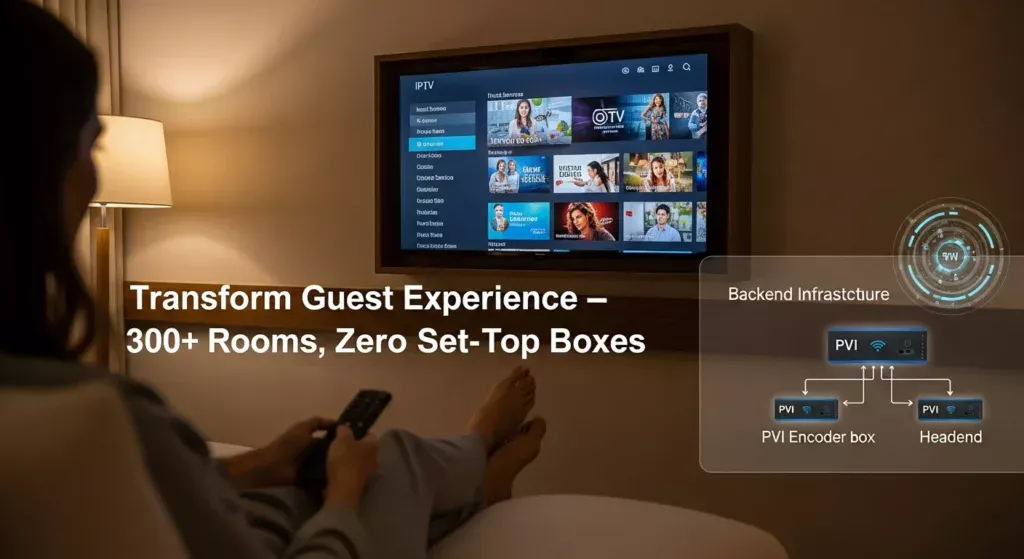
Hotels represent one of the most common applications for the PVI IPTV encoder box. Properties distribute cable/satellite channels, promotional content, and interactive services to guest rooms through existing IP networks.
Scenario Example: A 300-room resort encodes 50 cable channels using 13 quad-encoder units. Multicast delivery ensures each channel streams once regardless of how many guests are watching, dramatically reducing network bandwidth requirements compared to set-top box solutions. The system includes custom channels for hotel information, spa promotions, and restaurant menus—content easily updated without visiting guest rooms.
Key Advantages:
- Eliminates set-top boxes, reducing in-room equipment and maintenance
- Enables remote channel lineup changes and content updates
- Integrates with property management systems for personalized services
- Significantly lowers long-term operational costs versus traditional RF distribution
Corporate Broadcasting
Organizations use IPTV to distribute town halls, training content, and internal communications across office locations worldwide.
Scenario Example: A multinational corporation broadcasts quarterly all-hands meetings from headquarters to 25 regional offices. PVI IPTV encoder boxes at the source location encode the presentation in multiple bitrates for adaptive delivery. Remote offices access streams over the corporate WAN, with local caching servers reducing bandwidth on international links. Employees watch live on desktop computers or meeting room displays.
Key Advantages:
- Reaches geographically dispersed workforce simultaneously
- Records encoded streams for on-demand access
- Integrates with collaboration platforms and scheduling systems
- Delivers professional broadcast quality for executive communications
Education & Campus IPTV
Educational institutions deploy IPTV for lecture capture, campus announcements, emergency notifications, and student services.
Scenario Example: A university campus distributes 30 channels including news, weather, campus announcements, and captured lectures to 15 dormitories and 50 academic buildings. Students access content on smart TVs in common areas and through web-based players on personal devices. Lecture capture systems integrate with PVI encoders to automatically stream and record classes.
Key Advantages:
- Single infrastructure serves live distribution and video on demand
- Supports both scheduled programming and on-demand content
- Emergency notification capability for campus safety
- Cost-effective alternative to cable TV in student housing
Cable TV & Telecom Headends
Service providers rely on the PVI IPTV encoder box for professional headend operations, encoding broadcast channels for IP-based distribution to subscribers.
Scenario Example: A regional cable operator receives 150 channels via satellite and fiber. They deploy high-density PVI encoder racks to transcode all channels into H.265/HEVC for bandwidth-efficient delivery over fiber-to-the-home (FTTH) infrastructure. The system interfaces with subscriber management platforms, conditional access systems, and billing infrastructure.
Key Advantages:
- Professional broadcast-grade reliability and quality
- Efficient encoding reduces network capacity requirements
- Scales from hundreds to thousands of concurrent subscribers
- Integrates with industry-standard middleware and CAS platforms
Maintenance & Long-Term Reliability
Firmware Management Best Practices
Regular firmware updates maintain security, add features, and optimize performance:
Recommended Approach:
- Subscribe to manufacturer update notifications
- Review release notes to understand changes and compatibility requirements
- Test firmware in lab environment before production deployment
- Schedule updates during maintenance windows with minimal viewership
- Maintain rollback plans by documenting previous firmware versions
- Update encoders in phases (50% today, 50% next week) to minimize simultaneous issues
Update Frequency: Review firmware quarterly and apply updates semi-annually unless security patches require immediate deployment.
Cooling & Power Considerations
Proper environmental control extends hardware lifespan and prevents service interruptions:
Temperature Management:
- Maintain rack ambient temperature below 25°C (77°F) ideally
- Ensure adequate airflow spacing (minimum 1U between devices)
- Monitor internal temperatures via SNMP
- Set alert thresholds at 70°C to detect cooling issues early
- Clean dust filters quarterly in dusty environments
Power Infrastructure:
- Deploy UPS systems rated for at least 30 minutes runtime at full load
- Use power distribution units (PDUs) with per-outlet monitoring
- Implement redundant power supplies where critical applications demand
- Monitor power consumption trends to detect hardware degradation
- Document power requirements for capacity planning
Network Monitoring
Proactive monitoring prevents issues from impacting viewers:
Key Metrics to Monitor:
- Encoding bitrate consistency (should remain within 5% of target)
- Dropped frame count (should be zero or minimal)
- Network bandwidth utilization (should remain below 80% of link capacity)
- Packet loss and retransmission rates
- Stream uptime and interruption events
Recommended Tools:
- SNMP monitoring integrated with network management systems
- Specialized IPTV monitoring platforms (e.g., Witbe, StreamTest)
- VLC Media Player with detailed codec information for troubleshooting
- Network analyzers (Wireshark) for deep protocol investigation
Redundancy Planning
Mission-critical deployments require redundancy strategies:
Encoder Redundancy:
- Deploy backup encoders for critical channels
- Configure automatic failover using middleware or manual switching
- Maintain spare encoders for rapid replacement (1 spare per 10 active units)
Network Redundancy:
- Use dual network connections with VLAN redundancy
- Implement RSTP or other spanning tree protocols for automatic failover
- Consider diverse physical network paths for critical links
Power Redundancy:
- Dual power supplies fed from separate circuits
- UPS backup with generator support for extended outages
- Automatic transfer switches for critical facilities
Pro Tip: Test failover procedures quarterly to ensure backup systems function correctly when needed. Documentation should enable any qualified technician to execute failover procedures.
Conclusion
The PVI IPTV encoder box represents a mature, proven solution for professional video streaming applications where quality, reliability, and efficiency matter. Throughout this comprehensive guide, we’ve explored seven powerful benefits that distinguish this hardware encoder from software alternatives and consumer-grade options:
- Superior high-quality encoding that preserves source fidelity while optimizing bandwidth
- Ultra-low latency performance critical for live broadcasting applications
- Exceptional scalability enabling organic growth from small to large deployments
- Rock-solid reliability with enterprise-grade components designed for 24/7 operation
- Cost efficiency delivering superior total cost of ownership through reduced bandwidth and maintenance
- Simplified deployment with intuitive management interfaces and remote administration
- Professional-grade consistency ensuring predictable, repeatable performance
Whether you’re operating a hotel IPTV network, managing corporate communications, distributing educational content, or running a telecom headend, the PVI IPTV encoder box delivers the performance, reliability, and efficiency that professional applications demand.
As IPTV continues evolving toward higher resolutions, more efficient codecs, and increasingly demanding viewer expectations, investing in dedicated hardware encoding infrastructure positions your organization for long-term success. The combination of H.265/HEVC support, low-latency performance, and proven reliability makes the PVI IPTV encoder box not just a solution for today’s requirements, but a future-proof foundation for tomorrow’s streaming innovations.
👉 Explore professional IPTV solutions with the PVI IPTV encoder box and upgrade your streaming infrastructure today.
FAQs
Q1: What is a PVI IPTV encoder box used for?
A1: A PVI IPTV encoder box is used to convert live video signals (from HDMI, SDI, or component sources) into IP-based streams suitable for distribution over IPTV networks. It captures video in real-time, applies compression using codecs like H.264 or H.265, and outputs industry-standard streaming protocols (UDP, RTP, RTMP, HLS) that can be distributed across local networks or the internet. Common applications include hotel TV systems, corporate broadcasting, campus IPTV networks, and cable/telecom headend operations.
Q2: Does the PVI IPTV encoder box support H.265/HEVC?
A2: Yes, most modern PVI IPTV encoder box models support H.265/HEVC encoding in addition to the standard H.264/AVC codec. H.265 encoding delivers approximately 40-50% better compression efficiency than H.264, meaning you can achieve the same visual quality at significantly lower bitrates—resulting in substantial bandwidth savings and reduced network infrastructure costs. This makes H.265 support particularly valuable for bandwidth-constrained environments or when distributing high-resolution content like 4K/UHD streams.
Q3: Is the PVI IPTV encoder box suitable for large-scale deployments?
A3: Absolutely. The PVI IPTV encoder box is designed specifically for professional deployments and scales effectively from small installations to large enterprise systems. Features like multicast IPTV streaming support, remote management capabilities, SNMP integration, and robust hardware reliability make it ideal for large-scale applications. Organizations have successfully deployed hundreds of PVI encoders across distributed locations, managing them centrally through unified network management platforms. The modular architecture allows you to start with the capacity you need and expand organically as requirements grow.
Q4: How does the PVI IPTV encoder box compare to software encoders?
A4: The PVI IPTV encoder box offers several significant advantages over software encoders: (1) Lower latency – dedicated hardware achieves 200-500ms encoding latency versus 1-3+ seconds for software solutions; (2) Better reliability – purpose-built hardware delivers 24/7 operation without the crashes and resource conflicts that affect software; (3) Consistent performance – encoding quality and latency remain constant regardless of system load; (4) Lower power consumption – hardware encoders use 15-25W per channel versus 100-200W for software running on server hardware; (5) Simplified management – dedicated devices eliminate software compatibility issues and server maintenance overhead. While software encoders may have lower initial costs, the PVI IPTV encoder box typically delivers superior total cost of ownership for professional applications.