
Why do so many IPTV streams fail during peak viewing hours? For broadcasters, resellers, and live-streaming professionals, nothing is more frustrating than dealing with sudden stream drops, audio-video desync, and pixelated video quality when your audience is watching. These issues don’t just damage viewer experience—they destroy credibility and revenue. The solution lies in understanding and deploying a professional IPTV Encoder, the foundation of stable, broadcast-grade streaming infrastructure. With the global IPTV market projected to exceed $117 billion by 2028, reliable encoding technology has become mission-critical for anyone serious about professional streaming.
Introduction
Stream failures cost broadcasters thousands in lost viewership and advertising revenue. Whether you’re running a 24/7 IPTV channel, broadcasting live sports, or managing hotel entertainment systems, the IPTV Encoder you choose determines whether your content reaches viewers flawlessly or fails at critical moments. Professional IPTV hardware encoders are engineered for continuous operation, multi-protocol streaming, and enterprise-level reliability that consumer-grade solutions cannot match.
This guide breaks down the 11 critical features that separate reliable encoding hardware from solutions that leave you troubleshooting during live broadcasts.
How an IPTV Encoder Actually Works
Understanding your IPTV Encoder’s signal flow is essential for optimizing performance. The encoding process follows a precise path: video input → compression → IP delivery. Here’s what happens at each stage.
Your IPTV Encoder receives raw video signals through HDMI, SDI, or composite inputs. This uncompressed signal contains massive amounts of data—a single second of 1080p video at 60fps contains approximately 373 megabytes of information. Your encoder’s primary job is compressing this data stream to a manageable size without destroying visual quality.
The compression process uses advanced codecs like H.264 or H.265 to analyze each frame, identifying redundant information and encoding only the changes between frames. This technique, called inter-frame compression, reduces file sizes by 95% or more while maintaining broadcast quality.
After compression, the IPTV Encoder packages the video stream into IP packets using protocols like RTMP, SRT, or HLS. These packets travel across your network to streaming servers, CDNs, or directly to end-user devices. The encoding quality you set here directly impacts viewer experience—over-compress and you get pixelation, under-compress and you consume excessive bandwidth.
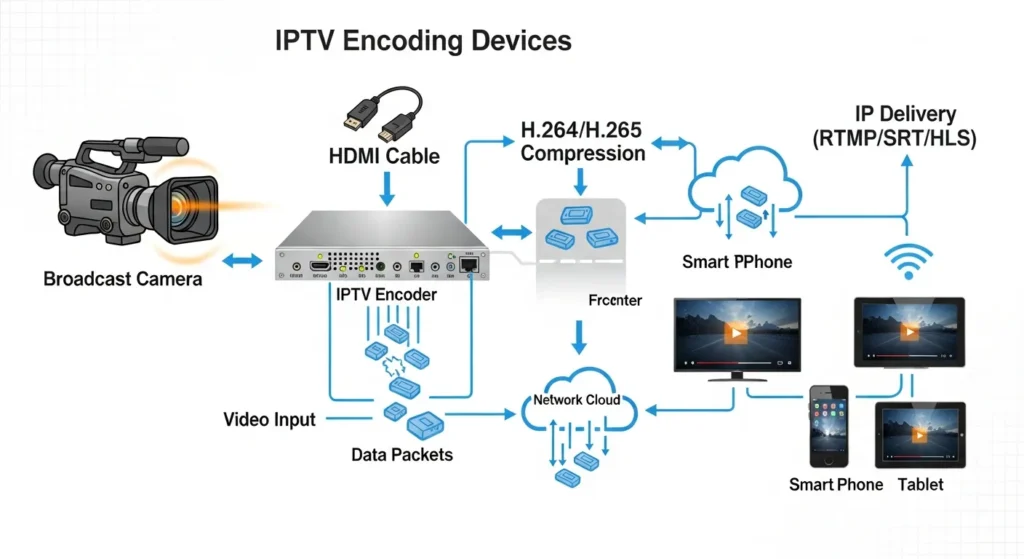
It’s important to distinguish encoding from decoding and transcoding. Encoding converts raw video to compressed digital format. Decoding reverses this process on the viewer’s device. Transcoding takes an already-encoded stream and re-encodes it to different bitrates or formats. Professional IPTV workflows often use dedicated hardware encoders at the source and software transcoders for adaptive bitrate delivery.
Critical Hardware Features That Define a High-Quality IPTV Encoder
Not all IPTV hardware encoders are created equal. The components and capabilities built into your encoder determine its reliability, quality ceiling, and operational lifespan.
Input Connectivity Options
Professional IPTV Encoders offer multiple input types: HDMI for consumer sources, SDI for broadcast equipment, and composite/component for legacy systems. The best encoders include loop-through outputs, allowing you to feed the same signal to multiple destinations simultaneously. This feature is essential for monitoring your source while encoding.
Processing Architecture
The choice between CPU-based and GPU-accelerated encoding chips dramatically affects performance. Hardware-based H.264 encoding chips deliver consistent frame rates and lower latency compared to software solutions running on general-purpose processors. Dedicated ASIC chips found in broadcast-grade encoders can handle 1080p60 encoding with sub-100ms latency.
Codec Support
H.264 (AVC) remains the industry standard for IPTV broadcasting due to universal device compatibility. H.265 (HEVC) delivers 40-50% better compression efficiency, crucial for 4K content or bandwidth-constrained networks. Professional encoders support both codecs, allowing you to choose based on your infrastructure and audience capabilities.
Bitrate Control Methods
Constant Bitrate (CBR) maintains consistent bandwidth usage, essential for predictable network capacity planning. Variable Bitrate (VBR) adjusts compression based on scene complexity, delivering better quality for the same average bitrate. Sports broadcasts benefit from CBR’s predictability, while on-demand content works well with VBR.
Audio Encoding Standards
High-quality IPTV requires proper audio handling. AAC audio compression offers the best quality-to-bitrate ratio for streaming, while MP3 provides broader compatibility with older devices. Professional encoders support embedded audio from HDMI/SDI plus separate analog audio inputs for external mixing.
Thermal Management
Continuous operation generates significant heat. Enterprise IPTV Encoders incorporate advanced cooling—active fans, heat sinks, or fanless designs. Proper thermal management extends hardware lifespan and prevents throttling during peak loads.
Power Redundancy
Mission-critical broadcasts require backup systems. High-end encoders accept dual power inputs with automatic failover. For 24/7 channels, this feature alone justifies professional hardware investment.
IPTV Encoder Setup Speed & Workflow Efficiency
Time is money in broadcasting. Your IPTV Encoder’s setup speed directly impacts operational costs and deployment flexibility.
Professional IPTV hardware encoders deploy rapidly—typically 15-30 minutes from unboxing to live streaming. This includes physical installation, network configuration, encoding setup, and stream verification. Software encoding solutions require hours of operating system configuration, driver installation, and complex application setup.
Modern IPTV Encoders offer web-based interfaces accessible from any browser, eliminating proprietary software installation. Advanced units include RESTful APIs for automation system integration. Enterprise encoders support automatic network discovery—connect to your network, launch the discovery tool, and locate the device without manual IP configuration.
PC-based software encoders require constant maintenance—operating system updates, security patches, and application updates introduce potential failure points. IPTV hardware encoders run embedded systems with minimal attack surfaces. Set up once, run for months without intervention.
Step-by-Step IPTV Encoder Configuration Guide
Proper configuration separates stable broadcasts from troubleshooting nightmares. Follow this proven workflow for optimal results.
Step 1: Connect Video and Audio Sources
Begin with source connections. For HDMI sources, use high-quality certified cables rated for your resolution. SDI connections require proper 75-ohm BNC cables with appropriate lengths (shorter is better—signal degradation increases beyond 100 meters for HD-SDI). Always verify your source signal is active before proceeding—many encoders display input signal status on their front panels or web interfaces.
Common beginner mistake: Connecting sources after powering on the encoder can cause input detection failures. Connect all sources first, then power up your IPTV Encoder.
Step 2: Assign IP Address and Network Parameters
Access your encoder’s network configuration through the web interface or front-panel controls. For permanent installations, assign static IP addresses to prevent DHCP lease expiration issues during long broadcasts. Document your network settings—IP address, subnet mask, gateway, and DNS servers—for future troubleshooting.
Optimization tip: Place your encoder on the same subnet as your streaming server to minimize network hops and reduce latency.
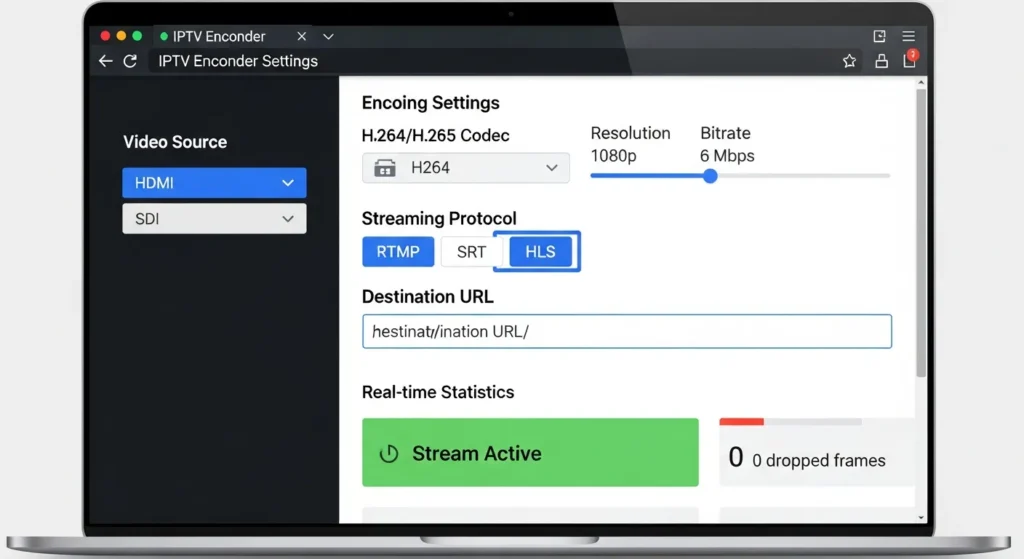
Step 3: Select Encoding Codec and Resolution
Choose your codec based on delivery requirements. H.264 offers maximum compatibility across all devices and platforms. H.265 works when targeting modern devices and you need bandwidth efficiency. Set resolution to match your source—encoding 1080p content from a 720p source wastes processing power and bandwidth.
Frame rate selection matters: 60fps for sports and fast motion, 30fps for talking-head content and news broadcasts. Higher frame rates double your bandwidth requirements, so choose appropriately.
Step 4: Configure Streaming Protocol and Destination
Select your streaming protocol based on infrastructure. RTMP remains popular for streaming to platforms like YouTube Live and Facebook. SRT provides better error correction for unreliable networks and long-distance contribution feeds. HLS generates adaptive bitrate streams for direct viewer delivery.
Enter your destination server URLs carefully—a single typo prevents stream delivery. Test connectivity using your encoder’s built-in ping or connection test features before going live.
Step 5: Test Stream Stability and Latency
Before launching to viewers, perform thorough testing. Stream for at least 30 minutes while monitoring for dropped frames, audio sync issues, and network errors. Professional IPTV Encoders provide detailed statistics—track these metrics to establish performance baselines.
Latency measurement: Use a stopwatch to measure the delay between a live action (clock second hand movement) and its appearance on the decoded stream. Acceptable latency varies by application—news broadcasts tolerate 3-5 seconds, interactive applications require sub-second delays.
IPTV Encoder Performance Metrics That Matter
Understanding performance specifications helps you choose the right encoder and optimize configuration.
Entry-level encoders handle 720p at 30fps. Mid-range units support 1080p60. Professional broadcast IPTV Encoders encode 4K at 60fps. Match encoder capabilities to current needs plus 2-3 years of growth.
Glass-to-glass latency includes encoding, transmission, and decoding delays. Professional encoders contribute 50-150ms encoding latency. Software solutions on underpowered hardware can exceed 500ms. Lower latency enables interactive applications like live auctions and sports betting.
Efficient encoders deliver better quality at lower bitrates. Well-tuned H.264 encoders produce broadcast-quality 1080p at 6-8 Mbps. Poor implementations require 12-15 Mbps for equivalent quality. This efficiency difference compounds across multiple channels.
Professional units support simultaneous multi-protocol output: RTMP for platform streaming, SRT for contribution feeds, HLS for viewer delivery, and UDP multicast for IPTV headend distribution.
Broadcast-grade IPTV Encoders target 99.99% uptime—approximately 52 minutes of downtime per year. The difference lies in component selection, thermal design, power supply quality, and embedded operating system stability.
IPTV Encoder vs Software Encoding Solutions
The hardware versus software encoding debate continues, but professional operations consistently migrate to dedicated hardware. Here’s why.
Reliability Comparison
Software encoders run on general-purpose computers with thousands of unrelated processes competing for resources. Windows updates, antivirus scans, and background applications cause encoding interruptions. Hardware encoders run purpose-built embedded systems with a single mission—encoding video. No surprise updates, no competing processes, no unexpected failures.
CPU Usage and System Impact
Software encoding consumes 60-80% CPU resources on modern processors. This thermal load requires aggressive cooling, increases electricity costs, and accelerates hardware wear. IPTV hardware encoders use specialized chips that complete encoding tasks with a fraction of the power and heat generation.
Long-Term Cost Analysis
A $2,000 IPTV Encoder operates for 5-7 years with minimal maintenance. A $1,000 PC plus $500 software license requires replacement every 3-4 years as operating systems and software versions advance. Factor in electricity costs, cooling, and IT management time—hardware encoders deliver lower total cost of ownership.
Scalability Considerations
Adding capacity with software means adding complete computer systems—expensive and space-consuming. Multi-channel hardware encoders pack 4-8 encoding engines in a single rack unit. Scaling from 10 to 50 channels requires less rack space, power, and cooling with hardware solutions.
Failure Point Analysis
Software encoding chains include: operating system, drivers, encoding application, and hardware components. Each element introduces failure potential. Hardware encoders eliminate the operating system and application layers—fewer components mean fewer failure modes.
Security Risk Assessment
General-purpose computers require constant security patching, antivirus updates, and network security measures. Embedded IPTV Encoders have minimal attack surfaces—no user logins, no web browsers, no email clients. This reduced exposure significantly lowers security risk in connected environments.
Advanced Encoder Options & Expansion Add-Ons
As operations grow, advanced features maintain quality and efficiency.
Multi-channel encoders process 4, 8, or 16 streams from a single device. Dual-stream encoders simultaneously produce high-bitrate master streams and low-bitrate mobile streams, simplifying adaptive delivery.
Some IPTV Encoder models support firmware upgrades enabling H.265 encoding. This extends hardware lifespan and improves bandwidth efficiency as viewer devices gain HEVC support.
Enterprise encoders include dual network interfaces, streaming to primary and backup servers. If the primary path fails, viewers automatically failover with zero interruption.
Professional productions require sophisticated audio handling. External audio mixer integration allows commentary overlay, multi-language tracks, and alert injection. IPTV Encoders with balanced audio inputs support these workflows.
Modern operations monitor encoder health remotely through cloud dashboards. Track encoding statistics, receive failure alerts, and adjust settings from anywhere—essential for distributed operations managing encoders across multiple locations.
Real-World IPTV Encoder Deployment Scenarios
24/7 IPTV Channel Broadcasting
Religious broadcasters, news channels, and thematic networks require continuous operation. Deploy professional IPTV Encoders with redundant power, aggressive cooling, and automatic recovery. Budget for backup encoders that automatically take over if primary units fail.
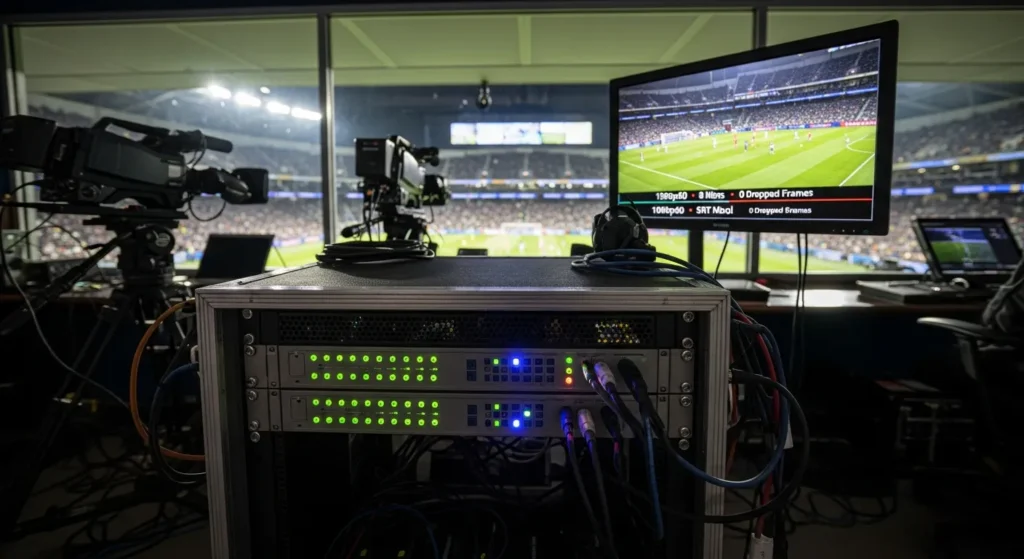
Stadium and Sports Venue Streaming
Live sports demand low latency and high frame rates. Use encoders supporting 1080p60 or 4K60 with sub-100ms latency. Configure SRT streaming for reliable contribution feeds from venue to broadcast center.
Hotel IPTV Systems
Hotels distribute hundreds of channels to guest rooms. IPTV headend systems use multi-channel encoders to convert broadcasts to IP streams. Deploy encoders supporting multicast distribution to efficiently serve thousands of simultaneous viewers.
Remote Education Networks
Universities stream lectures to distributed campuses. IPTV Encoders enable high-quality educational content delivery at fraction of traditional costs. Configure encoders for HLS output, allowing students to watch on any device.
Mobile Event Production
Wedding videographers and conference producers need portable encoding. Compact IPTV Encoders with ruggedized enclosures survive transport between venues. Battery power options enable operation without AC power.
IPTV Encoder Mistakes That Kill Stream Quality
Avoiding common configuration errors prevents frustrating quality problems and viewer complaints.
Over-Compression Errors
Pushing bitrates too low to save bandwidth destroys video quality. A 1080p stream encoded at 2 Mbps shows severe compression artifacts—blocky motion, color banding, and detail loss. Professional IPTV requires minimum 4 Mbps for 720p and 6 Mbps for 1080p. Test your content—sports and action require higher bitrates than talking-head content.
Wrong Protocol Selection
Using RTMP for contribution feeds across unreliable networks causes stream interruptions. RTMP lacks error recovery—packet loss breaks streams. SRT adds forward error correction and automatic retransmission, maintaining stream stability over lossy networks. Choose protocols based on network conditions, not just compatibility.
Poor Cooling Placement
Mounting IPTV Encoders in enclosed racks without ventilation causes thermal shutdown. Allow 2-3 inches clearance above and below rack-mounted units. Install rack fans to circulate air. Monitor internal temperatures through web interfaces—if encoders exceed 70°C (158°F), improve cooling before failure occurs.
Firmware Neglect
Manufacturers release firmware updates fixing bugs and adding features. Neglecting updates leaves encoders vulnerable to problems already solved by the manufacturer. Schedule quarterly firmware reviews. Test updates on non-critical encoders before deploying to production systems.
Network Bottleneck Ignorance
Encoding at 10 Mbps while connected through a congested 100 Mbps switch shared with 50 other devices guarantees problems. Calculate total bandwidth requirements—10 streams at 8 Mbps equals 80 Mbps minimum. Deploy gigabit switches with adequate capacity. Use VLAN segmentation to isolate IPTV traffic from data traffic.
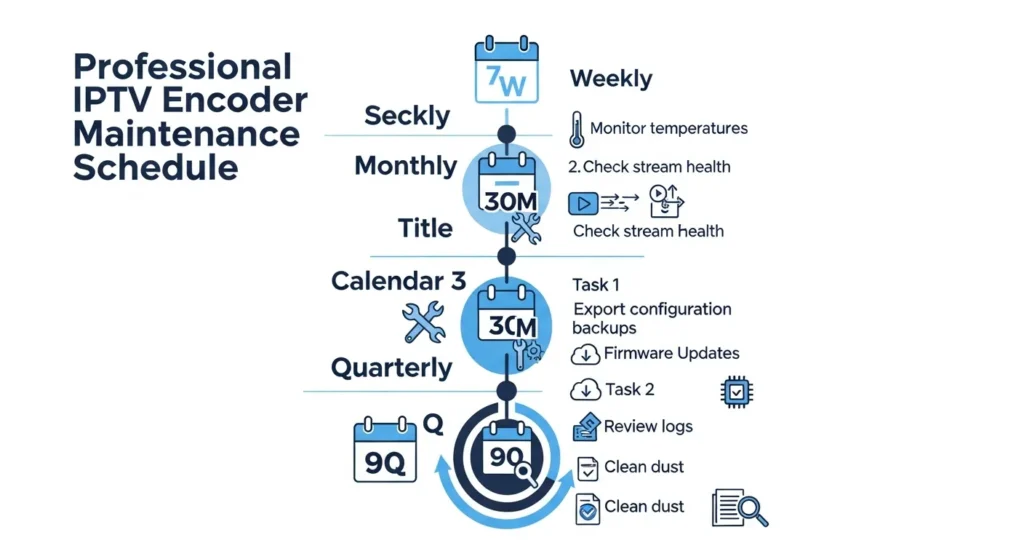
Maintaining an IPTV Encoder for Long-Term Reliability
Proper maintenance extends encoder lifespan from 3 years to 7+ years.
Maintain encoder environments between 15-25°C with 20-80% relative humidity. Install encoders away from heat sources and ensure adequate ventilation.
Establish quarterly firmware review cycles. Subscribe to manufacturer notifications for critical security patches. Maintain configuration backups before updates—if updates cause problems, quick rollback restores functionality.
Export encoder configurations monthly. Store backups in multiple locations. Configuration backup enables rapid replacement if hardware fails—load backup into replacement unit and resume broadcasting in minutes.
Professional IPTV Encoders typically provide 50,000-70,000 hours of operation before component failure—approximately 5-8 years at 24/7 operation. Plan replacement cycles accordingly.
Deploy UPS systems providing both battery backup and power conditioning. Ensure UPS capacity supports encoder power draw plus 30% overhead. Configure UPS integration for graceful shutdown during extended outages.
Conclusion
Professional IPTV broadcasting demands reliable, high-quality encoding infrastructure. The IPTV Encoder you choose determines whether your content reaches viewers flawlessly or fails at critical moments. By understanding the 11 game-changing features covered in this guide—from codec support and thermal management to protocol flexibility and power redundancy—you can build streaming workflows that deliver broadcast-quality content consistently.
Ready to build a reliable IPTV workflow? Upgrade to a professional IPTV Encoder today and experience stable, high-quality streaming that your viewers deserve. Share your encoder setup experiences in the comments, or explore our latest IPTV hardware guides for advanced deployment strategies.
Frequently Asked Questions
What makes an IPTV encoder different from a normal video encoder?
An IPTV Encoder is specifically optimized for streaming over IP networks, supporting protocols like RTMP, SRT, and HLS that video encoders designed for file output lack. IPTV encoders include features like adaptive bitrate streaming, low-latency configurations, and continuous 24/7 operation reliability that standard video encoders don’t prioritize. They’re built for live broadcasting, while general video encoders target file creation.
Can IPTV encoders stream to multiple servers at the same time?
Yes, professional IPTV Encoders support simultaneous multi-destination streaming. You can configure a single encoder to send streams to YouTube Live, Facebook, your private server, and a backup CDN simultaneously. This capability eliminates the need for separate encoders or stream splitter software, simplifying infrastructure while improving reliability through built-in redundancy.
Is an IPTV encoder required for 24/7 channels?
While technically possible to run 24/7 channels using software encoding on computers, professional IPTV hardware encoders are practically required for reliable continuous operation. Computer-based solutions suffer from operating system updates, security patches, and application crashes that interrupt broadcasts. Dedicated IPTV Encoders with embedded operating systems and redundant power systems deliver the 99.9%+ uptime that 24/7 broadcasting demands.
Which codec is better for IPTV—H.264 or H.265?
H.264 remains the best choice for maximum device compatibility, as virtually every smartphone, smart TV, and streaming device supports it. H.265 delivers 40-50% better compression efficiency, reducing bandwidth costs significantly for high-resolution content, but requires newer playback devices. For IPTV services targeting mass audiences, H.264 ensures universal compatibility. For bandwidth-constrained networks or 4K content, H.265 provides essential efficiency gains if your audience has compatible devices.